Introduction
Today, organizations collect huge amounts of data from different sources such as applications, websites, databases, APIs, cloud platforms, and business systems.
The major challenge is managing all this data using multiple separate tools for:
- Data Integration
- Data Engineering
- Data Warehousing
- Data Science
- Real-Time Analytics
- Business Intelligence
Microsoft Fabric helps solve this challenge by bringing multiple analytics workloads together into a unified platform.
Microsoft Fabric is becoming an important technology for professionals working in:
- Azure Data Engineering
- Data Analytics
- Business Intelligence
- Data Science
It provides an end-to-end environment where organizations can collect, store, transform, analyze, and visualize data.
Definition
What is Microsoft Fabric?
Microsoft Fabric is Microsoft’s unified, SaaS-based data and analytics platform.
It brings together different workloads in one environment, including:
- Data Factory
- Data Engineering
- Data Science
- Data Warehouse
- Real-Time Intelligence
- Power BI
In simple words:
Microsoft Fabric is an all-in-one platform for managing the complete data journey—from data collection to business insights.
One of the most important concepts in Microsoft Fabric is:
OneLake
OneLake acts as a unified data lake for an organization.
It helps organizations reduce unnecessary data silos and provides a common foundation for analytics workloads.
Architecture
Microsoft Fabric architecture is built around a unified data ecosystem.
1. Data Sources
Data can come from multiple sources such as:
- SQL Server
- Azure SQL Database
- APIs
- Excel Files
- CSV Files
- Cloud Applications
- Azure Storage
- On-premises Databases
Multiple Data Sources
│
▼
Microsoft Fabric
2. OneLake
OneLake is the centralized data lake experience in Microsoft Fabric.
It acts as a unified storage layer for organizational data.
Think of it as:
OneDrive for Data.
Different teams can work with data while maintaining a more unified data foundation.
3. Data Factory
Microsoft Fabric Data Factory is used for:
- Data Pipelines
- Data Movement
- Data Integration
- Workflow Automation
Example:
Source Database
↓
Fabric Data Pipeline
↓
OneLake
4. Data Engineering
The Data Engineering workload helps engineers:
- Transform data
- Build pipelines
- Work with notebooks
- Process large datasets
It commonly uses technologies such as:
- Apache Spark
- Notebooks
- Lakehouse
5. Lakehouse
A Lakehouse combines the flexibility of a Data Lake with analytical capabilities commonly associated with data warehouses.
It supports working with large volumes of structured and unstructured data.
A typical architecture can follow the Medallion Architecture:
Bronze Layer
Raw Data
↓
Silver Layer
Cleaned Data
↓
Gold Layer
Business Ready Data
6. Data Warehouse
Microsoft Fabric also provides Data Warehouse capabilities for SQL-based analytics.
It can be used for:
- Structured data
- SQL queries
- Reporting
- Business analytics
7. Data Science
The Data Science workload supports activities such as:
- Data exploration
- Machine Learning
- Predictive analytics
- Data preparation
8. Real-Time Intelligence
Real-Time Intelligence helps organizations work with streaming and event-based data.
Examples include:
- IoT data
- Application logs
- Real-time events
- Streaming data
9. Power BI
Power BI is deeply integrated into Microsoft Fabric.
It is used to create:
- Reports
- Dashboards
- Data Visualizations
- Business Insights
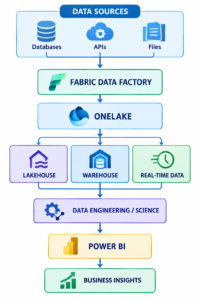
Microsoft Fabric Architecture
A simplified Microsoft Fabric architecture looks like this:
Working
Let’s understand how Microsoft Fabric works step by step.
Step 1: Connect to Data Sources
Microsoft Fabric can work with data coming from different systems.
Examples:
- SQL Databases
- APIs
- Excel
- Cloud Applications
- Data Lakes
Step 2: Ingest Data
Use Fabric Data Factory and other supported ingestion methods to move data.
Example:
SQL Database
↓
Data Pipeline
↓
OneLake
Step 3: Store Data in OneLake
The data is stored and organized within the Fabric data ecosystem.
OneLake provides a common data foundation for different workloads.
Step 4: Transform Data
Data Engineers can transform data using:
- Data Pipelines
- Notebooks
- Apache Spark
- Dataflows
Example:
Raw Data
↓
Data Cleaning
↓
Data Transformation
↓
Ready for Analytics
Step 5: Build Lakehouse or Warehouse
Depending on the requirement, data can be prepared for:
Lakehouse
Best suited for:
- Big data
- Data engineering
- Spark workloads
Warehouse
Best suited for:
- SQL analytics
- Structured data
- Business reporting
Step 6: Analyze the Data
Data Analysts and Engineers can analyze the processed data using:
- SQL
- Spark
- Notebooks
Step 7: Create Reports
Finally, data can be visualized using:
Power BI
Example:
Processed Data
↓
Semantic Model
↓
Power BI
↓
Dashboard
Advantages
1. Unified Analytics Platform
Microsoft Fabric brings multiple analytics workloads into one ecosystem.
2. OneLake
OneLake provides a unified data lake experience.
This can help reduce unnecessary data duplication and disconnected data environments.
3. Strong Power BI Integration
Fabric provides deep integration with Power BI.
This makes it easier to move from:
Data
↓
Transformation
↓
Analytics
↓
Visualization
4. Supports Multiple Workloads
Microsoft Fabric supports areas such as:
- Data Engineering
- Data Science
- Data Warehousing
- Data Integration
- Real-Time Analytics
- Business Intelligence
5. SaaS-Based Platform
Fabric reduces some infrastructure management compared with building and maintaining multiple separate analytics systems.
6. Supports Big Data Processing
Data Engineers can use:
- Apache Spark
- Notebooks
- Lakehouse architecture
for large-scale data workloads.
7. End-to-End Data Platform
Microsoft Fabric can support the complete data journey:
Data Collection
↓
Storage
↓
Transformation
↓
Analytics
↓
Visualization
Disadvantages
1. Learning Curve
Microsoft Fabric includes multiple workloads, so beginners may need time to understand:
- OneLake
- Lakehouse
- Warehouse
- Spark
- Power BI
2. Capacity Planning
Organizations need to monitor and manage capacity usage carefully.
3. Cost Management
Poor workload planning can lead to unnecessary capacity consumption and increased costs.
4. Migration Challenges
Organizations already using multiple existing data platforms may need planning to migrate workloads.
5. Advanced Skills Are Still Required
Although Fabric provides a unified environment, advanced workloads still require knowledge of:
- SQL
- PySpark
- Data Engineering
- Data Modeling
Best Practices
1. Use the Medallion Architecture
Organize data into layers.
Bronze Layer
Raw data.
Source Data
↓
Bronze
Silver Layer
Cleaned and transformed data.
Bronze
↓
Silver
Gold Layer
Business-ready data.
Silver
↓
Gold
This structure improves data organization and maintainability.
2. Avoid Unnecessary Data Duplication
Use a well-designed OneLake and data architecture strategy.
Avoid creating unnecessary copies of the same data.
3. Choose the Right Workload
Use the appropriate Fabric workload.
Use Data Factory for:
- Data movement
- Pipelines
- Integration
Use Data Engineering for:
- Spark processing
- Large-scale transformations
Use Warehouse for:
- SQL analytics
- Structured reporting
Use Power BI for:
- Reports
- Dashboards
4. Implement Proper Security
Use appropriate:
- Workspace permissions
- Role-based access
- Data access controls
Follow the principle of:
Least Privilege
Users should only have access to the data they need.
5. Monitor Capacity Usage
Regularly monitor:
- Compute usage
- Workload performance
- Resource consumption
This helps control costs.
6. Use Proper Naming Standards
Example:
LH_Sales_Data
WH_Customer_Analytics
PL_Load_Customer_Data
NB_Data_Transformation
Consistent naming makes projects easier to manage.
7. Use Version Control and Deployment Practices
For enterprise projects, maintain proper:
Development
↓
Testing
↓
Production
Use appropriate source control and deployment processes.
Tools Used with Microsoft Fabric
1. OneLake
Used as the unified data lake foundation.
2. Fabric Data Factory
Used for:
- Data Pipelines
- Data Integration
- Data Movement
3. Lakehouse
Used for:
- Data Engineering
- Big Data
- Apache Spark workloads
4. Data Warehouse
Used for:
- SQL
- Data Warehousing
- Business Analytics
5. Notebooks
Used for:
- PySpark
- Data Processing
- Data Exploration
6. Apache Spark
Used for large-scale:
- Data Transformation
- Data Processing
7. Power BI
Used for:
- Reports
- Dashboards
- Visualization
8. Dataflows
Used for data preparation and transformation workflows.
9. Azure DevOps / Git
Can be used as part of development and deployment workflows where supported by your organization’s development process.
Interview Questions
Basic Questions
1. What is Microsoft Fabric?
Microsoft Fabric is a unified SaaS-based platform that brings together data integration, data engineering, data warehousing, data science, real-time analytics, and business intelligence.
2. What is OneLake?
OneLake is the unified data lake foundation used within Microsoft Fabric.
3. What is a Lakehouse?
A Lakehouse combines the flexibility of a Data Lake with capabilities used for analytics and structured data processing.
4. What workloads are available in Microsoft Fabric?
Common Fabric workloads include:
- Data Factory
- Data Engineering
- Data Science
- Data Warehouse
- Real-Time Intelligence
- Power BI
5. What is the difference between OneLake and a Lakehouse?
OneLake is the broader unified data lake foundation.
A Lakehouse is a data item and architecture used for storing and working with data for analytics and engineering workloads.
Intermediate Questions
6. What is the Medallion Architecture?
The Medallion Architecture organizes data into:
Bronze → Raw Data
Silver → Cleaned Data
Gold → Business Data
7. What is the difference between a Lakehouse and Warehouse?
| Lakehouse | Warehouse |
| Supports Spark workloads | Primarily SQL analytics |
| Suitable for data engineering | Suitable for structured reporting |
| Works with large and varied data | Focuses on structured analytical data |
8. How does Microsoft Fabric integrate with Power BI?
Fabric provides deep integration with Power BI, allowing processed and modeled data to be used for reports and dashboards.
9. What is a Notebook in Microsoft Fabric?
A Notebook is an interactive environment used for:
- Writing code
- Data transformation
- Data analysis
- Spark processing
10. What is the role of Apache Spark in Fabric?
Apache Spark is used for large-scale data processing and transformation.
Advanced Questions
11. How do you optimize Microsoft Fabric workloads?
By:
- Using efficient data formats
- Reducing unnecessary data movement
- Optimizing transformations
- Monitoring capacity usage
- Designing efficient data architectures
12. How do you secure data in Microsoft Fabric?
Using:
- Workspace permissions
- Role-based access
- Appropriate data access controls
- Organizational governance policies
13. When would you use a Lakehouse instead of a Warehouse?
Use a Lakehouse when working with:
- Large datasets
- Spark workloads
- Data engineering
- Semi-structured data
Use a Warehouse primarily for:
- SQL analytics
- Structured data
- Reporting workloads
14. What is the role of Data Factory in Microsoft Fabric?
Fabric Data Factory is used for data integration, movement, and pipeline orchestration.
15. Why is OneLake important?
OneLake provides a more unified data foundation that helps different analytics workloads work with organizational data.
Conclusion
Microsoft Fabric is a modern unified analytics platform that brings together multiple data technologies in one environment.
It supports:
✅ Data Integration
✅ Data Engineering
✅ Data Science
✅ Data Warehousing
✅ Real-Time Analytics
✅ Business Intelligence
With OneLake as a central data foundation and deep Power BI integration, Microsoft Fabric helps organizations build modern end-to-end analytics solutions.
For aspiring Azure Data Engineers and Data Analysts, learning Microsoft Fabric can be highly valuable because it combines important concepts from:
- Data Engineering
- SQL
- PySpark
- Apache Spark
- Data Warehousing
- Power BI
🚀 Start Your Microsoft Fabric & Azure Data Engineering Journey!
Build practical skills in the technologies used for modern data platforms:
🔥 Microsoft Fabric
🔥 Azure Data Factory
🔥 Azure Synapse Analytics
🔥 SQL
🔥 PySpark
🔥 Azure Databricks
🔥 Power BI
💻 Learn data engineering concepts, work on practical projects, and build skills for modern cloud data careers.