Introduction
Modern organizations generate massive amounts of data from applications, websites, databases, IoT devices, APIs, and business systems. Managing and analyzing this data requires a powerful platform that can handle both traditional data warehousing and big data analytics.
This is where Azure Synapse Analytics comes in.
Azure Synapse Analytics is Microsoft’s cloud analytics service that brings together technologies for:
- Data warehousing
- Big data analytics
- SQL analytics
- Apache Spark processing
- Data integration
- Data exploration
It provides a unified environment where Data Engineers, Data Analysts, and Data Scientists can work with large volumes of data.
For example:
Data Sources
↓
Azure Data Lake
↓
Azure Synapse Analytics
↓
SQL + Spark Processing
↓
Power BI Reports
Definition
What is Azure Synapse Analytics?
Azure Synapse Analytics is a cloud-based analytics platform from Microsoft Azure that combines enterprise data warehousing, big data processing, data integration, and analytics in a unified environment.
It allows users to analyze data using:Architecture
Azure Synapse Analytics consists of several important components.
1. Synapse Workspace
The Synapse Workspace acts as the main environment for managing analytics workloads.
It provides access to:
- SQL analytics
- Spark
- Pipelines
- Data integration
- Data exploration
- Monitoring
- SQL
- Apache Spark
- Data pipelines
- Serverless technologies
In simple words:
Azure Synapse Analytics helps organizations store, process, and analyze large volumes of data using SQL and big data technologies.
Synapse provides a workspace where users can perform multiple data-related tasks without constantly switching between separate tools.
2. Synapse Studio
Synapse Studio is the web-based interface used to work with Azure Synapse.
Using Synapse Studio, users can:
- Create SQL scripts
- Develop Spark notebooks
- Build pipelines
- Monitor workloads
- Manage data
3. Azure Data Lake Storage
Azure Synapse commonly works with Azure Data Lake Storage Gen2 for storing large amounts of data.
Data may include:
- CSV files
- JSON files
- Parquet files
- Delta files
- Log files
Example:
Data Sources
↓
Azure Data Lake Storage
↓
Azure Synapse
4. Serverless SQL Pool
A Serverless SQL Pool allows users to query data directly from the data lake without managing dedicated infrastructure.
For example, you can query files stored in Azure Data Lake using SQL.
Concept:
Azure Data Lake
↓
Serverless SQL
↓
Query Data
5. Dedicated SQL Pool
A Dedicated SQL Pool provides dedicated compute resources for enterprise data warehousing workloads.
It is suitable for:
- Large-scale analytics
- Data warehousing
- High-performance SQL workloads
6. Apache Spark Pool
A Spark Pool is used for big data processing.
It supports languages such as:
- Python
- PySpark
- Scala
- SQL
- .NET
Spark is useful for processing large datasets and performing complex transformations.
7. Synapse Pipelines
Synapse Pipelines are used for:
- Data movement
- Data integration
- Workflow orchestration
- Scheduling
They provide capabilities similar to Azure Data Factory pipelines.
8. Integration Runtime
Integration Runtime provides the infrastructure required to move data between different systems.
It helps connect:
- Cloud systems
- On-premises systems
- Private networks
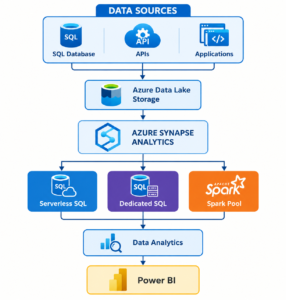
Azure Synapse Architecture
A simplified Azure Synapse architecture looks like this:
Working
Let’s understand how Azure Synapse Analytics works step by step.
Step 1: Collect Data
Data is collected from multiple sources such as:
- SQL Server
- Azure SQL Database
- APIs
- Applications
- Cloud storage
- On-premises databases
Step 2: Store Data
The data is commonly stored in:
Azure Data Lake Storage Gen2
The data lake can contain:
Raw Data
↓
Processed Data
↓
Business Ready Data
Step 3: Ingest Data
Data can be moved into the platform using:
- Synapse Pipelines
- Azure Data Factory
- Copy activities
- Other ingestion methods
Step 4: Process Data
Depending on the workload, data can be processed using:
SQL
Used for:
- Queries
- Reporting
- Data warehousing
Apache Spark
Used for:
- Big data processing
- Data transformation
- Machine learning preparation
Step 5: Analyze Data
Data Analysts and Data Engineers can query and analyze the processed data.
Example:
Raw Data
↓
Transformation
↓
SQL Analytics
↓
Business Insights
Step 6: Create Reports
The final data can be connected to:
Microsoft Power BI
This allows organizations to create:
- Dashboards
- Reports
- Business insights
- Data visualizations
Advantages
1. Unified Analytics Platform
Azure Synapse brings together:
- SQL
- Spark
- Data pipelines
- Analytics
in one environment.
2. Supports Big Data
Synapse can process large volumes of structured and unstructured data.
3. SQL and Spark Integration
Users can work with both:
- Traditional SQL workloads
- Big data Spark workloads
4. Serverless Analytics
Serverless SQL allows users to query data without managing dedicated infrastructure.
5. Strong Azure Integration
Synapse integrates with:
- Azure Data Lake
- Azure Data Factory
- Azure Databricks
- Power BI
- Azure Key Vault
6. Scalable
Resources can be selected and scaled based on workload requirements.
7. Enterprise Data Warehousing
Dedicated SQL capabilities support enterprise-level analytics workloads.
Disadvantages
1. Can Be Complex for Beginners
Understanding multiple components such as:
- SQL Pools
- Spark Pools
- Pipelines
- Data Lakes
can be challenging.
2. Cost Management Is Important
Dedicated compute resources and large workloads can increase costs if they are not properly managed.
3. Requires Technical Knowledge
Users may need knowledge of:
- SQL
- Data Warehousing
- Apache Spark
- Cloud Computing
4. Performance Optimization Requires Experience
Large-scale workloads require proper optimization.
For example:
- Partitioning
- Data distribution
- File optimization
- Query optimization
Best Practices
1. Use Efficient File Formats
For large datasets, prefer efficient analytics-friendly formats such as:
- Parquet
- Delta, where supported by your architecture
These formats can improve performance and reduce unnecessary data processing.
2. Partition Large Datasets
Partition data based on useful columns such as:
- Date
- Year
- Month
- Region
Example:
Sales Data
2026
├── January
├── February
└── March
Partitioning can improve query performance when designed appropriately.
3. Choose the Right Compute Option
Use the right technology for the workload.
Use Serverless SQL for:
- On-demand queries
- Data exploration
- Querying files in the data lake
Use Dedicated SQL for:
- Enterprise data warehousing
- Predictable, sustained workloads
Use Spark for:
- Big data processing
- Complex transformations
4. Implement Security
Use security features such as:
- Role-Based Access Control
- Managed Identity
- Azure Key Vault
- Encryption
- Private networking
5. Monitor Performance
Regularly monitor:
- Query execution time
- Resource usage
- Pipeline execution
- Spark workloads
6. Optimize SQL Queries
Avoid unnecessary:
SELECT *
Instead, select only the required columns.
Also:
- Filter data early
- Use appropriate data types
- Optimize joins
7. Use Development and Production Environments
Maintain separate environments for:
Development
↓
Testing
↓
Production
This reduces the risk of production issues.
8. Use Version Control
Integrate development workflows with:
- GitHub
- Azure DevOps
This helps teams manage changes and collaborate effectively.
Tools
Azure Synapse is commonly used with the following tools and services.
Azure Data Lake Storage Gen2
Used for large-scale data storage.
Azure Data Factory
Used for data integration and orchestration.
Apache Spark
Used for big data processing and transformation.
Azure Databricks
Can be used alongside Synapse for advanced Spark and data engineering workloads.
Microsoft Power BI
Used for:
- Dashboards
- Reports
- Data visualization
Azure Key Vault
Used for secure management of:
- Passwords
- Secrets
- Keys
GitHub
Used for:
- Version control
- Collaboration
Azure DevOps
Used for:
- CI/CD
- Deployment automation
- Source control
Interview Questions
Basic Questions
1. What is Azure Synapse Analytics?
Azure Synapse Analytics is a cloud-based analytics service that combines data warehousing, big data analytics, SQL, Spark, and data integration capabilities.
2. What is Synapse Studio?
Synapse Studio is the web-based development and management interface for Azure Synapse Analytics.
3. What is a Serverless SQL Pool?
A Serverless SQL Pool allows users to query data in the data lake using SQL without managing dedicated infrastructure.
4. What is a Dedicated SQL Pool?
A Dedicated SQL Pool provides dedicated compute resources for enterprise data warehousing workloads.
5. What is a Spark Pool?
A Spark Pool provides Apache Spark compute resources for large-scale data processing.
Intermediate Questions
6. What is the difference between Serverless and Dedicated SQL Pool?
| Serverless SQL | Dedicated SQL |
| On-demand querying | Dedicated compute |
| No infrastructure management | Resources are provisioned |
| Suitable for data lake queries | Suitable for data warehousing |
7. How does Synapse integrate with Azure Data Lake?
Synapse can access and process data stored in Azure Data Lake Storage Gen2 using SQL and Spark.
8. What are Synapse Pipelines?
Synapse Pipelines are used for data movement, transformation, and workflow orchestration.
9. Which languages are supported by Spark in Synapse?
Common options include:
- PySpark
- Scala
- SQL
- .NET languages
10. How does Synapse integrate with Power BI?
Processed and modeled data can be used with Power BI for reporting, dashboards, and business intelligence.
Advanced Questions
11. How can you improve Synapse query performance?
By using techniques such as:
- Partitioning
- Efficient file formats
- Query optimization
- Selecting appropriate compute
- Reducing unnecessary data scans
12. When would you use Spark instead of SQL?
Use Spark for:
- Large-scale transformations
- Complex data processing
- Semi-structured data
- Big data workloads
13. How do you secure Azure Synapse?
Using:
- RBAC
- Managed Identity
- Azure Key Vault
- Encryption
- Private endpoints and networking controls
14. What is data partitioning?
Data partitioning divides large datasets into smaller logical sections to improve data management and potentially improve query performance.
15. What is the role of Azure Data Lake in Synapse?
Azure Data Lake acts as a scalable storage layer for raw, processed, and analytical data.
Conclusion
Azure Synapse Analytics is a powerful cloud analytics platform that combines:
✅ Data Warehousing
✅ SQL Analytics
✅ Apache Spark
✅ Big Data Processing
✅ Data Integration
✅ Power BI Integration
It enables organizations to process and analyze large volumes of data using a unified environment.
For aspiring Azure Data Engineers, learning Azure Synapse provides valuable knowledge of:
- Data lakes
- SQL analytics
- Big data
- Apache Spark
- Data pipelines
- Enterprise data warehousing
Combined with Azure Data Factory, Azure Databricks, SQL, and PySpark, Azure Synapse is an important part of a modern Azure data engineering skill set.
🚀 Build Your Career in Azure Data Engineering!
Learn the technologies used in modern cloud data platforms:
🔥 Azure Data Factory
🔥 Azure Synapse Analytics
🔥 Azure Databricks
🔥 SQL
🔥 PySpark
🔥 Microsoft Fabric
💻 Learn practical concepts, build real-world projects, and develop the skills needed for modern data engineering roles.