Introduction
In today’s digital world, organizations collect huge amounts of data from databases, websites, applications, APIs, cloud platforms, and on-premises systems. The challenge is not just storing this data—it is also about collecting, moving, transforming, and managing it efficiently.
This is where Azure Data Factory (ADF) plays an important role.
Azure Data Factory is one of Microsoft’s popular cloud-based data integration services. It helps Data Engineers build automated data pipelines to move and transform data between different systems.
For example:
SQL Server → Azure Data Factory → Azure Data Lake → Azure Synapse Analytics
Azure Data Factory is widely used in modern ETL and ELT workflows and is an important skill for aspiring Azure Data Engineers.
Definition
What is Azure Data Factory?
Azure Data Factory (ADF) is a cloud-based data integration and orchestration service provided by Microsoft Azure.
It allows organizations to:
- Connect to multiple data sources
- Extract data
- Transform data
- Load data into target systems
- Automate workflows
- Schedule data pipelines
- Monitor data movement
In simple terms:
Azure Data Factory helps move and orchestrate data from different sources to different destinations.
ADF supports both:
ETL
Extract → Transform → Load
and
ELT
Extract → Load → Transform
Architecture
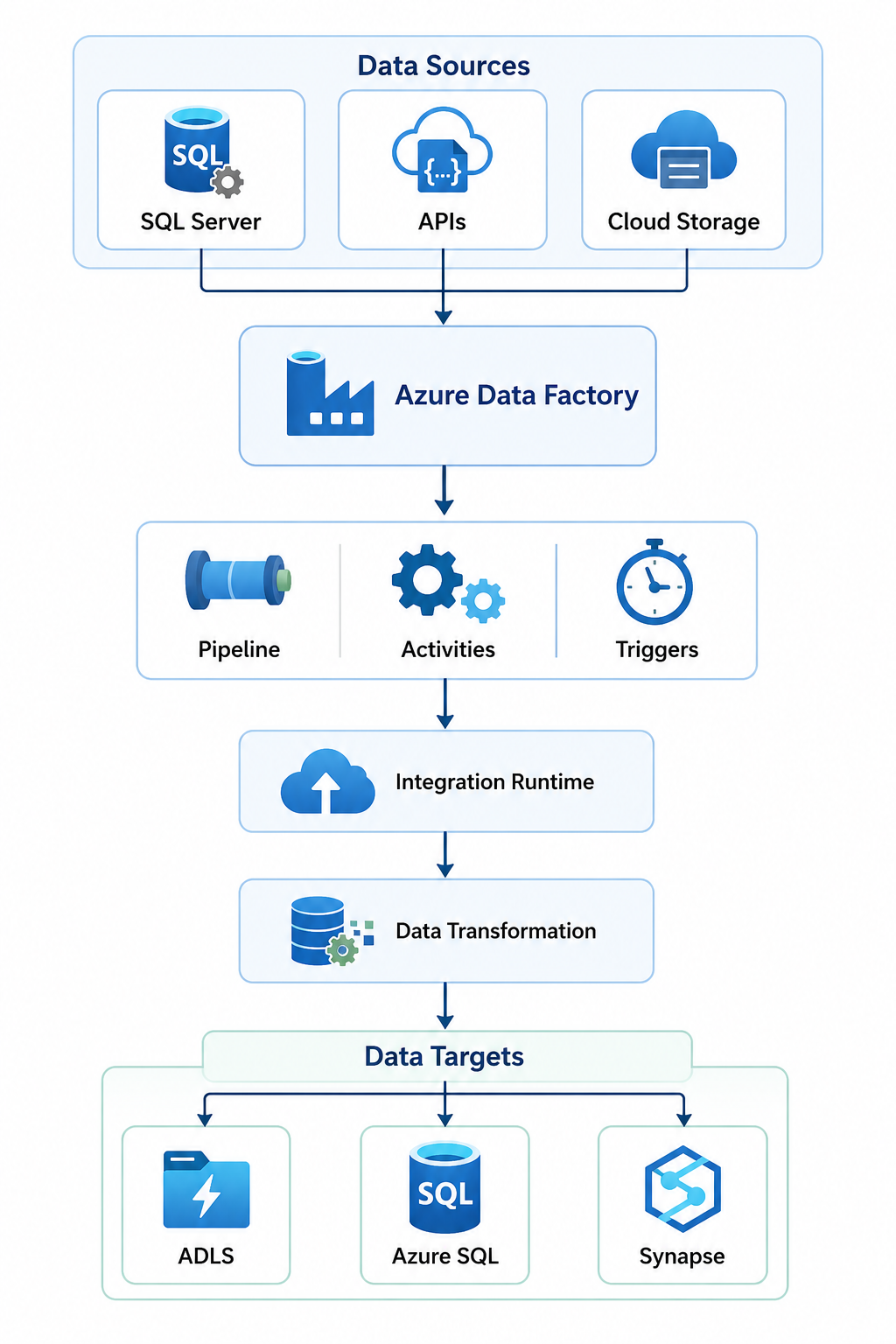
Azure Data Factory consists of several important components.
1. Pipeline
A Pipeline is a logical grouping of activities that perform a complete data workflow.
For example:
Extract Customer Data
↓
Transform Data
↓
Load into Data Warehouse
All these activities can be organized inside one pipeline.
2. Activities
An Activity represents a task performed inside a pipeline.
Common activities include:
- Copy Activity
- Lookup Activity
- Web Activity
- Stored Procedure Activity
- Execute Pipeline Activity
- Data Flow Activity
Example:
Copy Data → Transform Data → Load Data
Each step is performed using one or more activities.
3. Linked Services
Linked Services define the connection information required to connect Azure Data Factory with external systems.
Examples include:
- Azure SQL Database
- SQL Server
- Azure Blob Storage
- Azure Data Lake Storage
- Amazon S3
- REST APIs
- Oracle Database
Think of a Linked Service as a connection string or connection configuration.
4. Datasets
A Dataset represents the structure of data that ADF uses.
Examples:
- SQL Table
- CSV File
- JSON File
- Parquet File
For example:
Linked Service
↓
Connection to Azure SQL
↓
Dataset
↓
Customer Table
5. Integration Runtime
The Integration Runtime (IR) provides the infrastructure required to perform data movement and transformation.
There are three major types:
Azure Integration Runtime
Used for:
- Cloud-to-cloud data movement
- Cloud data processing
Self-hosted Integration Runtime
Used for:
- On-premises data
- Hybrid environments
Azure-SSIS Integration Runtime
Used for running:
- SQL Server Integration Services packages
6. Triggers
Triggers automatically start pipelines.
Common trigger types include:
Schedule Trigger
Runs a pipeline at a specific time.
Example:
Every Day at 9:00 AM
Event Trigger
Runs when an event occurs.
Example:
New File Uploaded → Run Pipeline
Tumbling Window Trigger
Runs pipelines at fixed time intervals.
Architecture
Working
Let’s understand how Azure Data Factory works step by step.
Step 1: Connect to Data Sources
First, connect Azure Data Factory to different data sources using Linked Services.
Examples:
- SQL Server
- MySQL
- Oracle
- REST APIs
- Azure Blob Storage
Step 2: Create Datasets
Define the data you want to work with.
For example:
Source Dataset:
Customer.csv
Destination Dataset:
Customer_Table
Step 3: Create a Pipeline
Create a pipeline that defines the complete workflow.
Example:
Get Data
↓
Validate Data
↓
Transform Data
↓
Load Data
Step 4: Add Activities
Add activities to perform specific tasks.
For example:
SQL Server
↓
Copy Activity
↓
Azure Data Lake
Step 5: Transform Data
ADF can transform data using:
- Mapping Data Flows
- Azure Databricks
- Azure Functions
- Stored Procedures
- Azure Synapse Analytics
Step 6: Schedule the Pipeline
Use triggers to automate pipeline execution.
Example:
Every Day
↓
Run Pipeline
↓
Load Latest Data
Step 7: Monitor the Pipeline
ADF provides monitoring features to check:
- Successful runs
- Failed runs
- Execution time
- Activity details
Advantages
1. Cloud-Based Service
No need to manage physical infrastructure.
2. Supports Multiple Data Sources
ADF supports connections with many cloud and on-premises systems.
Examples:
- SQL Server
- Azure Storage
- Oracle
- APIs
- Amazon S3
3. Low-Code Development
Many pipelines can be created using a visual interface.
4. Automation
Pipelines can run automatically using triggers.
5. Scalability
ADF can handle different data volumes and workloads using managed cloud infrastructure.
6. Hybrid Data Integration
ADF can connect:
On-Premises Systems
↓
Azure Cloud
using Self-hosted Integration Runtime.
7. Integration with Azure Services
ADF works well with:
- Azure Databricks
- Azure Synapse
- Azure Data Lake
- Azure SQL
- Azure Key Vault
Disadvantages
1. Complex Pipelines Can Be Difficult to Manage
Large projects with many pipelines may become difficult to maintain.
2. Limited Advanced Transformations
For complex transformations, you may need tools like:
- Azure Databricks
- Apache Spark
3. Debugging Can Take Time
Finding issues in large and complex pipelines may require experience.
4. Cost Management
Poorly designed pipelines and unnecessary compute usage can increase costs.
5. Learning Curve
Beginners need to understand concepts such as:
- ETL
- Pipelines
- Linked Services
- Integration Runtime
- Datasets
Best Practices
1. Use Parameterization
Avoid creating separate pipelines for similar tasks.
Instead, use parameters.
Example:
Pipeline Parameter:
Table_Name
The same pipeline can process multiple tables.
2. Use Azure Key Vault
Never store:
- Passwords
- API Keys
- Connection strings
directly inside your pipelines.
Use:
Azure Key Vault
3. Implement Error Handling
Use:
- Retry policies
- Failure paths
- Alerts
- Logging
Example:
Pipeline
│
├── Success → Continue
│
└── Failure → Send Alert
4. Use Proper Naming Standards
Example:
PL_Copy_Customer_Data
LS_Azure_SQL
DS_Customer_Table
TR_Daily_Load
5. Monitor Pipeline Performance
Regularly check:
- Pipeline duration
- Failed activities
- Data volume
- Integration Runtime performance
6. Use Incremental Data Loading
Avoid loading the entire dataset every time.
Instead:
Old Data → Skip
New Data → Load
7. Use Version Control
Integrate Azure Data Factory with:
- GitHub
- Azure DevOps
This helps teams manage changes safely.
Tools
Azure Data Factory is commonly used with the following tools:
Azure Data Lake Storage
Used for storing large amounts of structured and unstructured data.
Azure Databricks
Used for advanced data transformation using Apache Spark.
Azure Synapse Analytics
Used for large-scale analytics and data warehousing.
Azure SQL Database
Used for storing relational data.
Azure Key Vault
Used for securely managing secrets and credentials.
GitHub
Used for version control and collaboration.
Azure DevOps
Used for CI/CD and deployment automation.
Power BI
Used for reporting and data visualization.
Interview Questions
Basic Questions
1. What is Azure Data Factory?
Azure Data Factory is a cloud-based data integration and orchestration service used to create, schedule, and manage data pipelines.
2. What is a Pipeline in ADF?
A Pipeline is a logical grouping of activities that perform a complete data workflow.
3. What is an Activity?
An Activity represents a single task inside a pipeline.
Example:
- Copy Data
- Execute Stored Procedure
- Run Notebook
4. What is a Linked Service?
A Linked Service contains connection information for external data sources and services.
5. What is a Dataset?
A Dataset represents the structure or data object used by an activity.
Intermediate Questions
6. What is Integration Runtime?
Integration Runtime provides the infrastructure required for data movement and transformation.
7. What is the difference between Azure IR and Self-hosted IR?
Azure IR: Used primarily for cloud-based data movement and processing.
Self-hosted IR: Used to access on-premises or private network data sources.
8. What is Copy Activity?
Copy Activity is used to move data from a source to a destination.
9. What are Triggers?
Triggers automatically execute pipelines based on schedules, events, or time windows.
10. What is Mapping Data Flow?
Mapping Data Flow is a visual transformation feature used to build data transformation logic without writing Spark code directly.
Advanced Questions
11. How do you implement incremental loading?
By loading only new or changed data using:
- Watermark columns
- Last modified dates
- Timestamps
12. How do you secure credentials in ADF?
Using:
- Azure Key Vault
- Managed Identity
13. How do you handle pipeline failures?
Using:
- Retry policies
- Error handling activities
- Monitoring
- Alerts
14. What is parameterization in ADF?
Parameterization allows dynamic values to be passed into pipelines, datasets, and linked services.
15. How do you optimize ADF performance?
By:
- Using parallel processing
- Implementing incremental loads
- Optimizing Integration Runtime
- Reducing unnecessary activities
- Using efficient file formats
Conclusion
Azure Data Factory is a powerful cloud-based service for building modern data integration pipelines.
It helps Data Engineers:
✅ Connect multiple data sources
✅ Move large volumes of data
✅ Automate ETL and ELT workflows
✅ Transform data
✅ Schedule pipelines
✅ Monitor data operations
Azure Data Factory is especially valuable for organizations building modern cloud data platforms using Azure.
For aspiring Azure Data Engineers, learning ADF is an essential step toward understanding real-world data pipelines and cloud data integration.
CTA 🚀
🚀 Want to Become an Azure Data Engineer?
Start learning the technologies used in real-world data engineering projects:
🔥 Azure Data Factory
🔥 SQL
🔥 PySpark
🔥 Azure Databricks
🔥 Azure Synapse Analytics
🔥 Microsoft Fabric
💻 Learn practical data engineering concepts with real-time projects and hands-on training.